How do you check if your funeral home appears in AI search? Start with the moment it matters most. A family, three hours after a death, sits at the kitchen table with a phone. They do not open a directory. They open ChatGPT, or Google, and type “funeral director near me” or “what do I do when someone dies.” Somewhere, an AI system is deciding which two or three businesses to say out loud, and whether yours is one of them.
Until June 2026, there was no honest way to answer that question. You could guess, or you could pay for a third-party tool making similar guesses. Now you can watch it happen, directly, using the same tools the platforms themselves provide. This article walks you through each check, live, one platform at a time.
If you want the grounding first, the definitions of GEO and AEO and why any of this matters, start with our GEO guide for funeral homes. This article assumes you already know why AI visibility matters and want to see, concretely, where your own funeral home stands.
Why can’t you just “rank” for AI search the way you rank on Google?
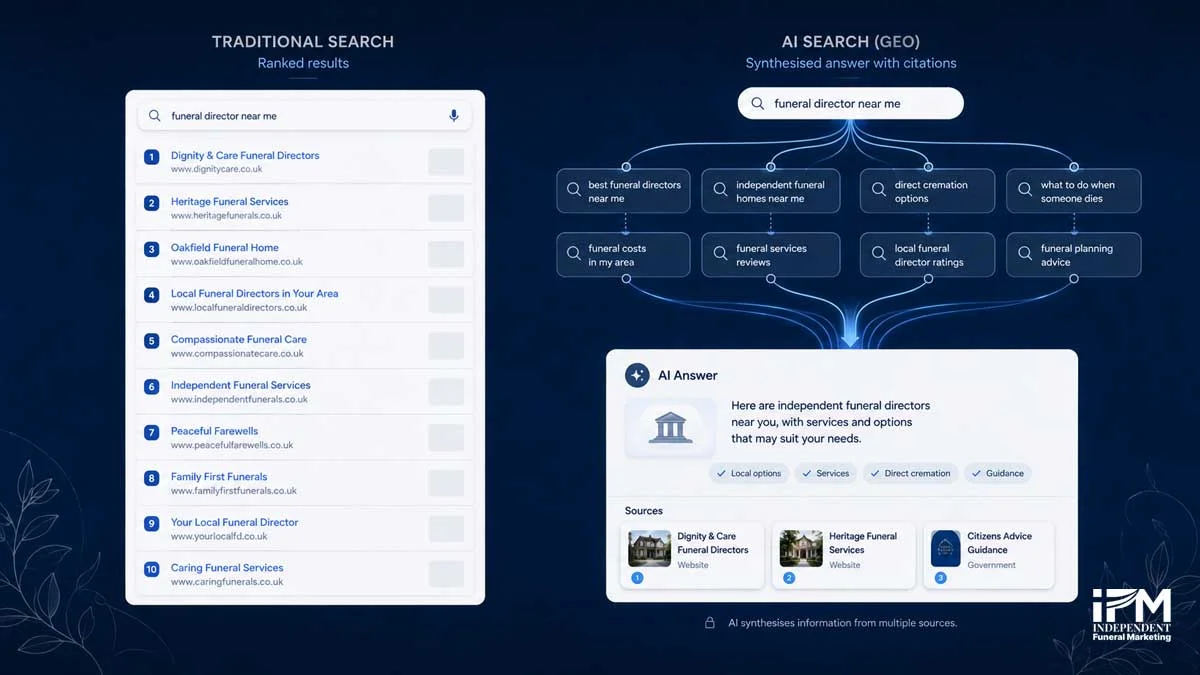
Stand behind the AI for a second. Before it answers, Google’s own documentation explains it may run a process called query fan-out, “issuing multiple related searches across subtopics and data sources, to develop a response” [1]. One family typing “funeral director near me” can silently become five or six searches happening in the background. Your page might influence the answer without ever appearing for the exact words that were typed.
OpenAI, Perplexity and Anthropic each describe broadly similar live-retrieval processes for their own answer features, though the exact mechanics differ between platforms, and none publish a like-for-like ranking system either. That is why the rest of this article checks visibility per platform, using each platform’s own method, rather than hunting for one universal “AI rank.”
How do you check if you’re showing up in Google AI Overviews and AI Mode?
Open Search Console now, if you have access, and follow along.
- Go to Performance, then find the Generative AI report.
- Open the Pages tab.
- Look for pages receiving AI Overview or AI Mode impressions, and note which ones.
That is roughly the shape of what you’re looking for, a per-page breakdown of impressions. Google’s Search Console Help documentation describes the real report as showing “how many times links to your site were shown to a user in a generative AI feature on Google Search” [2]. Worth stating plainly: it is impressions only, not clicks, and not the exact query. The UK rollout is also phased, so the report may not exist for your property yet.
Because the report cannot show which questions triggered an impression, run the manual test below yourself, in an incognito window, not your own logged-in browser.
Try it now
Open an incognito window, run each question through the platform you're checking, and tick it off as you log the result.
0 of 4 tested
Repeat each query on more than one day. AI Overviews are inconsistent even for identical searches, so a single pass tells you less than you’d think. Log the result each time: whether an AI Overview appeared, whether your business was named, whether your website was cited, and which page.
One caveat worth carrying forward: the Search Console report covers both AI Overviews and AI Mode, but does not clearly separate the two. Do not expect a cleaner split than actually exists.
How do you check if you’re showing up in ChatGPT, Perplexity and Claude?
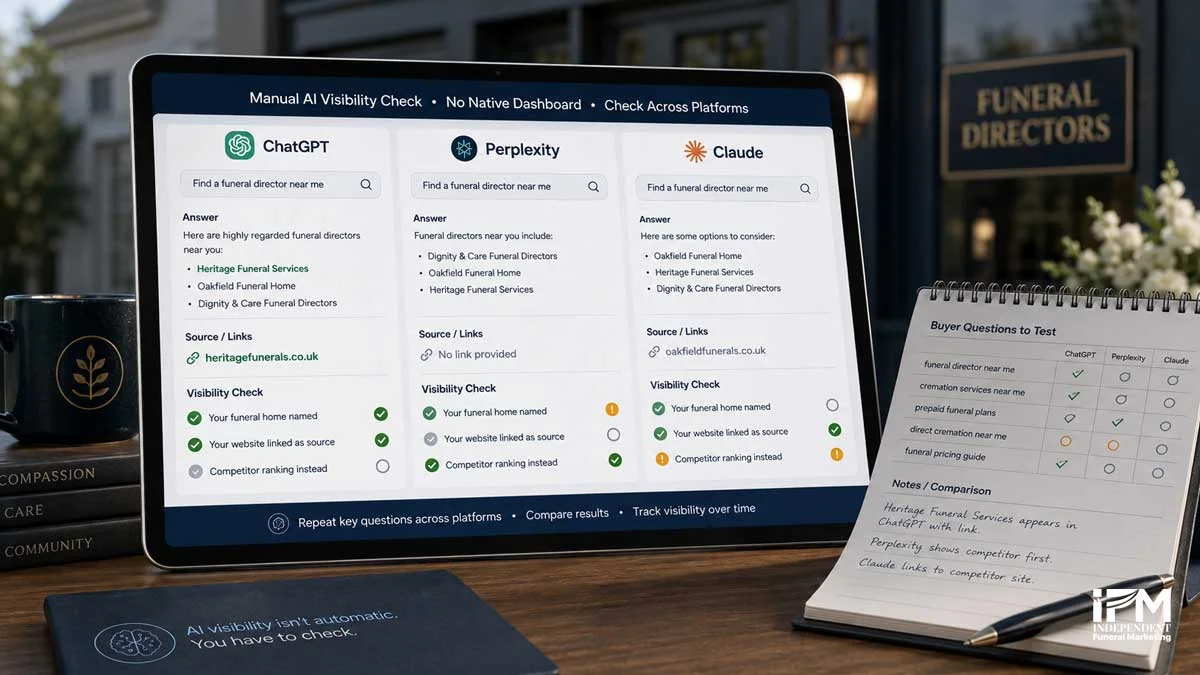
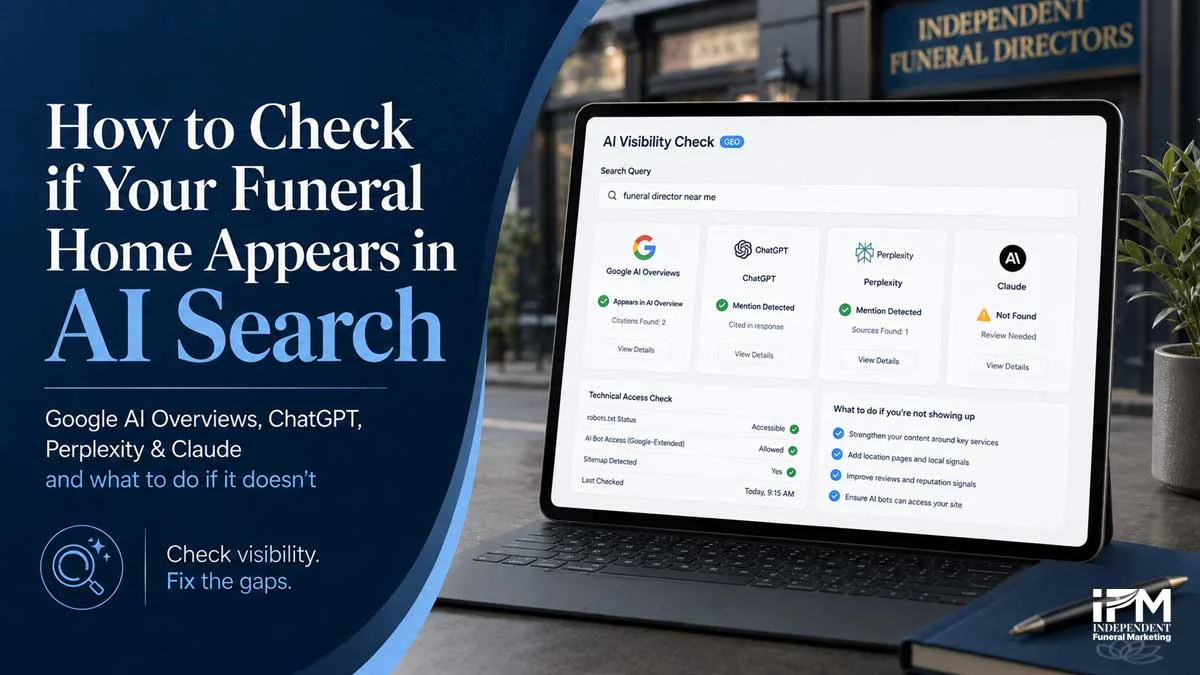
Take the same four questions from the checklist above and run them through each of the three platforms in turn: ChatGPT with browsing or search enabled, Perplexity, and Claude with web search enabled where available. For each answer, note three things: is the business named, is the website linked as a source, and which competitors appear instead.
Perplexity and OpenAI both document live, user-triggered fetches that can pull a page into an answer even outside the platform’s normal indexing cycle, so a business can occasionally appear even with a thin web presence. That is not something to rely on, but it explains why the same search can produce a different answer from one day to the next.
Keep the comparison platform-neutral. There is no verified data showing one of these three matters more than another for funeral-related searches, so treat all three as equally worth checking rather than picking a favourite.
Is your website even accessible to the AI platforms in the first place?
Every major AI platform now splits its web access into two or three separately controlled jobs, a bot that trains models, a bot that fetches a page live when a user asks a direct question, and, for some platforms, a bot that builds a dedicated search index. Blocking one does not block the others. Toggle the bots below to see what each one actually controls.
Click a bot to see what blocking it actually does
OpenAI (ChatGPT)
Perplexity
Anthropic (Claude)
OpenAI’s own documentation is direct about the search-index bot: “OAI-SearchBot is used to surface websites in search results in ChatGPT’s search features… we recommend allowing OAI-SearchBot in your site’s robots.txt file” [3]. Perplexity draws a similar line, describing PerplexityBot as the bot that “surface[s] and link[s] websites in search results on Perplexity,” separate from Perplexity-User, which “generally ignores robots.txt rules” since a real person triggered the fetch [4]. Anthropic runs the same three-way split for Claude, and its support documentation notes that disabling Claude-User or Claude-SearchBot “may reduce your site’s visibility for user-directed web search” [5].
Google is the case that’s easy to get wrong. Google-Extended is a robots.txt setting that only controls Gemini app training and grounding, and it has no effect on AI Overviews, AI Mode, or standard Search. There is no robots.txt setting for AI Overviews or AI Mode at all, the only opt-out is the Search Console control itself.
To check your own site, visit yourdomain.com/robots.txt directly in a browser and confirm there is no blanket “Disallow: /” rule sitting above these bot names. If the file looks unfamiliar, ask a web developer to confirm what it is blocking.
Why might you rank well on Google but still be invisible in AI answers?
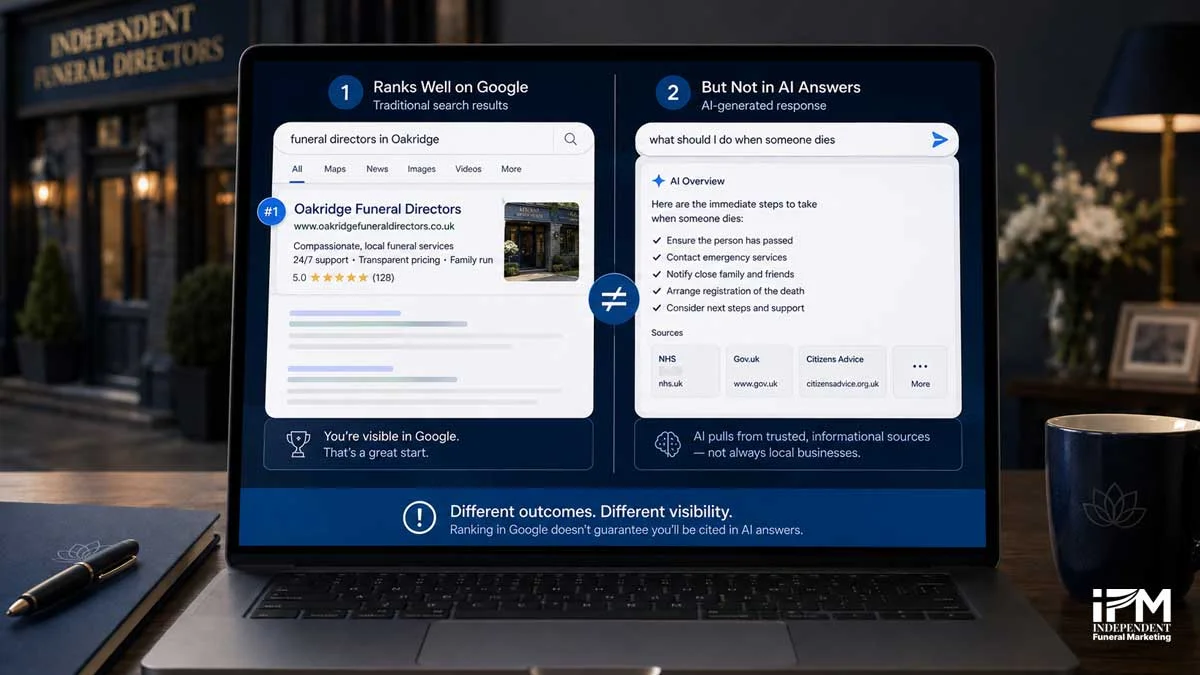
This is a genuine, common confusion, and it is not a sign of a broken website.
That is a real shift, not a fixed rule, so treat the exact figure as a snapshot rather than a permanent fact. The funeral-specific version plays out often: a funeral home’s homepage might rank first for “funeral directors in [town]” because Google trusts its local relevance, while an AI answering “what should I do when someone dies” pulls from a completely different page, or a different site entirely, because it is assembling factual, informational content rather than local business listings.
The practical fix is not to chase rankings harder. It is to understand what actually earns a citation, which is where mentioned, cited and recommended come in.
What’s the difference between being mentioned, cited and recommended by AI?
No AI platform publishes this three-tier framework officially, so treat it as a practical way to describe what you find during testing, not a term you will see used elsewhere.
- Mentioned: the AI names your business in the answer text, with no link attached.
- Cited: the AI links to a specific page on your website as a source.
- Recommended: the AI actively names your business as the answer to a direct “best X near me” style question, not just a supporting citation.
Ahrefs is explicit that this is a correlation, not proof of cause, and the study skews toward larger, established brands, so treat the figure as supporting evidence rather than a guarantee. It is a reasonable explanation for why NAP consistency, FAQ content and active reviews matter: they are exactly the kind of consistent, cross-referenced mentions AI systems draw on when deciding whether to name a specific local business.
What should you actually do with what you find?
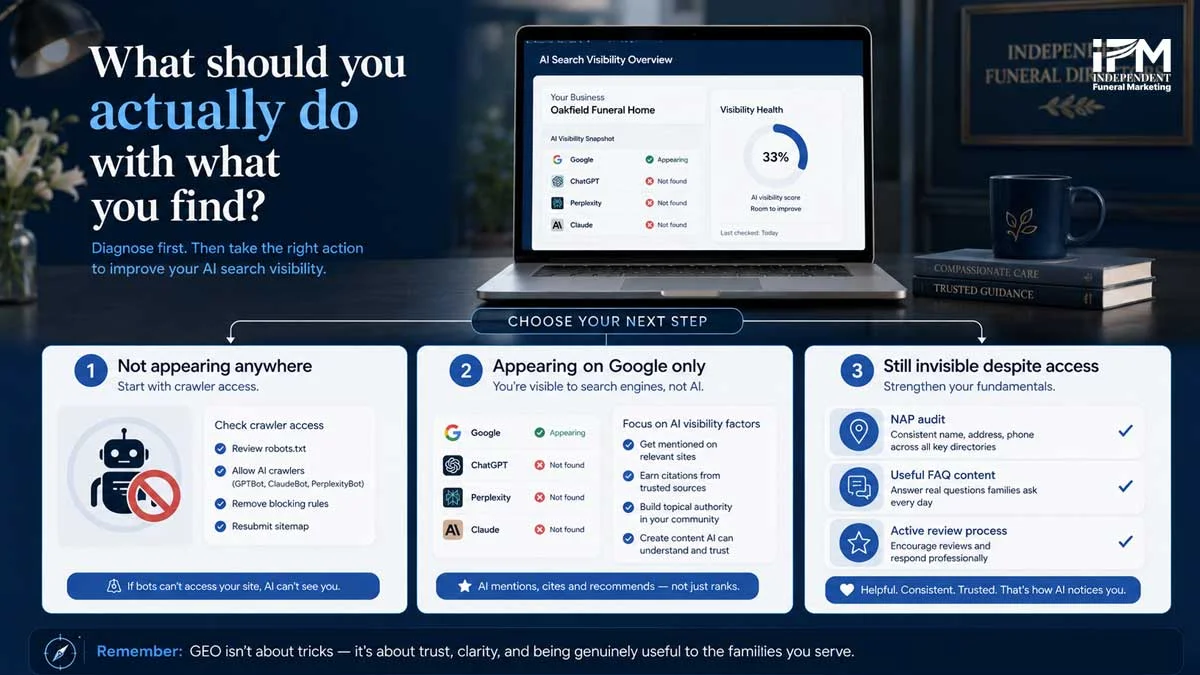
Treat this as a short, honest triage rather than a single fix:
- Not appearing anywhere. Start with the crawler-access check above. A blocked bot makes everything else irrelevant.
- Appearing on Google but not on ChatGPT, Perplexity or Claude. Focus on the mentioned, cited and recommended factors, since consistent web mentions are the strongest lever available. For the mechanics behind why this happens, see how Perplexity and ChatGPT recommend funeral services.
- Not appearing anywhere despite good crawler access. Go back to the basics set out in what a funeral home website needs to publish for AI search: consistent business details, services and prices in plain text, notices on your own site, and an active review process.
If working through this triage on your own feels like more than you have time for, IFM’s AI search optimisation service builds this checking and fixing process into an ongoing system rather than a one-off audit.
How often should you check, and what does progress look like?
AI citation behaviour shifts with model updates and is inherently inconsistent, even from one day to the next for an identical search. A monthly spot-check with the same fixed question list gives you a trend to compare against, rather than a single noisy data point.
As the UK rollout of the Generative AI performance report widens, tracking the Google side of this becomes easier to do passively. ChatGPT, Perplexity and Claude will continue to require manual spot-checks for the foreseeable future, since none of them currently offer a native alternative.
Frequently Asked Questions
Why am I not getting an AI Overview for my own business name?
AI Overviews only appear when Google’s systems judge a generative answer adds value over standard results, so many searches, including some brand-name searches, simply won’t trigger one. This is normal and not a sign of a technical problem.
How do I check which pages Google’s AI is pulling from my site?
Google Search Console’s Generative AI performance report, launched June 2026, shows which of your pages received AI Overview and AI Mode impressions, broken down by page, country and date. It shows impressions only, not clicks or the exact queries involved.
Does blocking AI crawlers in robots.txt affect my funeral home’s visibility?
Yes, but only the specific bot blocked. OpenAI, Perplexity and Anthropic each run separate bots for training, live user queries, and search indexing, so blocking one, such as a training bot, does not affect whether the platform can still name or cite the business in a live answer.
Does Google-Extended control whether I appear in AI Overviews?
No. Google-Extended only controls whether content is used for Gemini app training and grounding. AI Overviews and AI Mode run on the standard Google Search index and have no separate robots.txt control, the only opt-out is inside Search Console itself.
Why does a competitor with a lower Google ranking appear in AI Overviews when I don’t?
Ranking position and AI citation are related but no longer closely tied. Recent analysis found only around 37 to 38 percent of AI Overview citations come from pages ranking in the traditional top 10 for the same search, so a page can be an AI source without ranking highly, and vice versa.
Does schema markup guarantee I’ll be cited by AI Overviews?
No. Google’s own documentation states there are no special schema requirements to appear in AI Overviews or AI Mode. FAQPage schema also no longer produces a visible rich result in standard Google Search, following changes made in 2023 and a full removal completed by mid-2026.
What’s the difference between being mentioned and being cited by an AI platform?
A mention is the AI naming a business in its answer text with no link. A citation is the AI linking to a specific page as a source. A business can be mentioned without a citation, or cited without being named prominently in the answer itself.
Do unlinked mentions of my funeral home help with AI visibility?
Research by Ahrefs across 75,000 brands found unlinked web mentions correlate more strongly with AI Overview visibility than backlinks do. This is a correlation, not proven cause and effect, but it supports building a consistent, name-checked presence across directories, press and community sites, not just links.
How often should I check my funeral home’s AI visibility?
Monthly is a practical starting cadence. Use the same list of buyer-intent questions each time and log the results, since AI answers can be inconsistent even for identical searches, and a single check is not a reliable read on where a business stands.
What you now know that almost no other funeral home does
Go back to the family at the kitchen table. The check you just walked through, Search Console’s report, the manual searches, the robots.txt look, is the same check that determines whether your name gets read out in that moment. Almost no independent funeral home has run it yet, simply because the tools and documentation needed to do it properly are only weeks old. That is an opportunity, not a criticism.
If you would rather have this checked, fixed and monitored for you, get in touch with IFM and we will walk you through where your funeral home currently stands.
References
- [1] Google Search Central, AI Features and Your Website, developers.google.com/search/docs/appearance/ai-features
- [2] Google Search Console Help, Generative AI performance report (Search), support.google.com/webmasters/answer/16984139
- [3] OpenAI, Overview of OpenAI Crawlers, developers.openai.com/api/docs/bots
- [4] Perplexity, Perplexity Crawlers documentation, docs.perplexity.ai/docs/resources/perplexity-crawlers
- [5] Anthropic Support, Does Anthropic crawl data from the web, and how can site owners block the crawler?, support.anthropic.com/en/articles/8896518
- [6] Ahrefs, AI Overview citation and top 10 ranking overlap analysis, ahrefs.com/blog/ai-overview-citations-top-10, March 2026
- [7] Ahrefs, An Analysis of AI Overview Brand Visibility Factors (75K Brands Studied), ahrefs.com/blog/ai-overview-brand-correlation