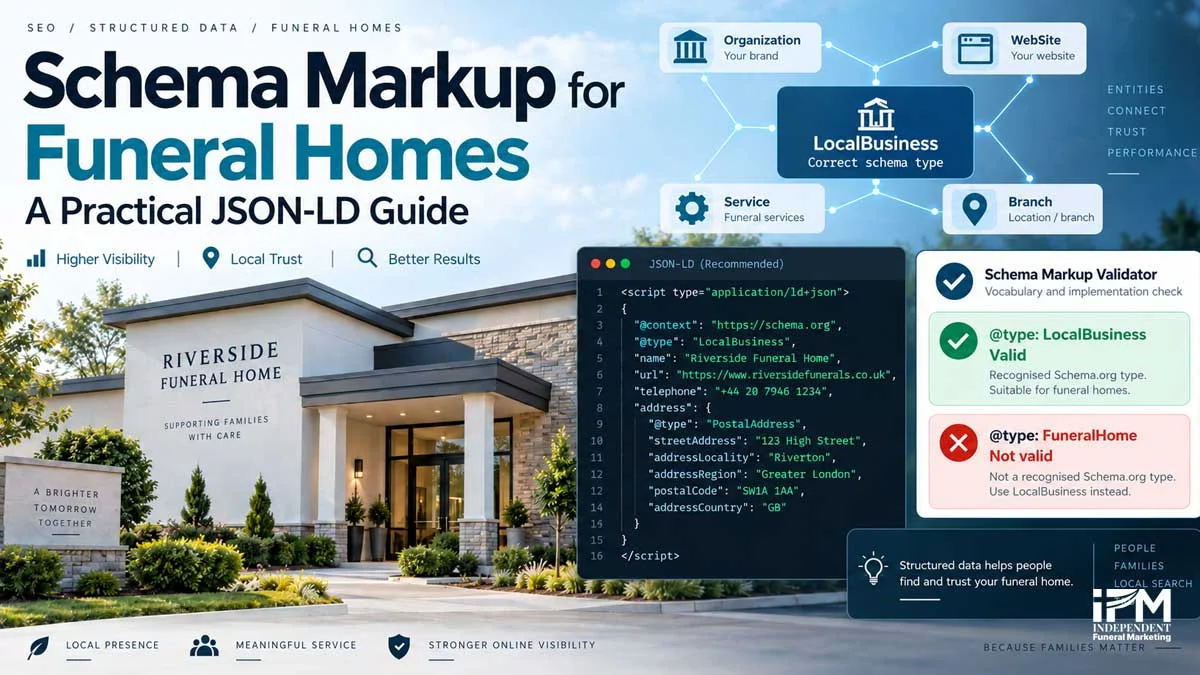
A funeral director building schema markup for funeral homes usually hits the same fork within the first five minutes: which Schema.org type actually applies here? During IFM’s own research for this guide, an AI-generated draft confidently recommended a dedicated “FuneralHome” type. It sounded right. It is not real.
Checked against schema.org’s own type hierarchy, run through the Schema Markup Validator, and cross-checked independently against ChatGPT’s own answer to the same question, the result was consistent every time: FuneralHome does not exist in Schema.org’s current vocabulary. This guide corrects that claim with evidence, then covers everything a funeral director or their developer needs to implement schema correctly, from the first LocalBusiness node through to CMA-compliant pricing, review restrictions, and ongoing maintenance.
This is a companion to IFM’s technical SEO and on-page SEO guides for funeral homes, both of which already introduce schema markup briefly. This guide goes further: full JSON-LD examples, a complete property reference, and the funeral-sector nuances (UK classification codes, 24-hour call handling, obituary pages) that a generic schema tutorial has no reason to cover.
What schema markup should a funeral home use?
Schema.org defines LocalBusiness as a physical business or branch of an organisation, and it is the correct available type for a funeral director’s premises. No recognised funeral-specific subtype currently exists in Schema.org’s vocabulary, a fact verified directly against schema.org’s own full type hierarchy rather than assumed. That differs from advice already circulating elsewhere, including the AI-generated claim IFM caught and corrected during research for this guide.
{
  "@context": "https://schema.org",
  "@type": "LocalBusiness",
  "@id": "https://www.example.co.uk/#localbusiness",
  "name": "Example Funeral Directors",
  "description": "An independent funeral director serving Bromley and surrounding areas."
}
The rest of this guide covers exactly how to implement, test and maintain that entity correctly, including the properties, comparisons and code examples a funeral director’s own developer will need. For the broader technical foundations this sits on, see IFM’s technical SEO for funeral home websites guide, linked above.
Why funeral homes should use LocalBusiness, not FuneralHome
This is the single most important correction in this guide. The vocabulary gap is real and checkable: schema.org’s own full type hierarchy lists every LocalBusiness subtype it recognises, and FuneralHome is not one of them. Using an undefined type is not a minor stylistic choice. It produces a genuine vocabulary error, even when the surrounding JSON is otherwise syntactically valid.
Rejected by the Schema Markup Validator
{
  "@context": "https://schema.org",
  "@type": "FuneralHome",
  "name": "Example Funeral Directors"
}
Illustrative representation of a Schema Markup Validator result, not a real screenshot. Running this through validator.schema.org returns an undefined-type error, because FuneralHome does not exist in the recognised vocabulary.
Accepted by the Schema Markup Validator
{
  "@context": "https://schema.org",
  "@type": "LocalBusiness",
  "name": "Example Funeral Directors"
}
The same structure, with LocalBusiness in place of FuneralHome, validates cleanly because LocalBusiness is genuinely defined in Schema.org’s vocabulary.
Funeral specificity should come from an accurate description, dedicated Service nodes and correct industry classification, not from inventing a type. Read on to IFM’s on-page SEO for funeral homes guide, linked above, for how that same visible content also supports rankings more broadly.
LocalBusiness vs Organization, Crematorium and Cemetery
Schema markup for a website works best as an entity graph, not a strict hierarchy. Organization sits at the top of that graph and represents the overall business, its legal name, logo and social profiles, and is normally declared once, most often on the homepage. LocalBusiness represents each physical branch beneath it, holding the location-specific facts a branch page needs: address, phone number and opening hours. Even a single-location funeral director benefits from both nodes, not LocalBusiness alone, since Organization is what a WebSite node, a logo and brand-level identifiers attach to. Crematorium and Cemetery describe real Schema.org types, but they are facility types (Place, under CivicStructure), not business types. Using them for a funeral director that arranges services elsewhere is a genuine, checkable mistake. A funeral director arranging cremations should combine LocalBusiness with a Service node, never swap in Crematorium.
| Situation | Correct modelling | Avoid |
|---|---|---|
| Independent funeral director | LocalBusiness | Undefined FuneralHome type |
| Director arranging cremations | LocalBusiness plus Service | Crematorium |
| Director arranging burials | LocalBusiness plus Service | Cemetery |
| Business operating a crematorium | Separate LocalBusiness and Crematorium entities | Treating distinct premises as one entity |
| Business operating a cemetery | Separate LocalBusiness and Cemetery entities | Using Cemetery for the funeral director |
| Multi-branch group | Parent Organization plus one LocalBusiness per branch | One node containing every branch address |
Click your situation to see the correct type
Illustrative summary of Schema.org's recognised vocabulary, not a screenshot of any tool.
Building the entity graph: single-location and multi-branch
Think of the graph, not a hierarchy. Organization anchors the brand and is normally declared once, on the homepage. WebSite sits beneath it and represents the site as a whole. Every physical branch gets its own LocalBusiness node beneath that, and every inner page gets its own WebPage node linking back to WebSite, with Service, FAQPage and BreadcrumbList nodes attached to the page they actually appear on. For a fictional single-location firm, Example Funeral Directors, that looks like this:
Example Funeral Directors Ltd
= Organization (declared once, usually the homepage)

exampledirectors.co.uk
= WebSite

Example Funeral Directors (the branch)
= LocalBusiness

/services/direct-cremation/
= WebPage
  ├── Service (the direct cremation service itself)
  ├── FAQPage (the FAQs visible on that page)
  └── BreadcrumbList (the page's position in the site)
Never combine several branch addresses into one LocalBusiness entity, and never reuse the same @id across branches. This is where most WordPress and plugin implementations go wrong (see the WordPress section below): plugins typically model Organization and one location well, then silently fail to add a second, distinct LocalBusiness node for branch two.
Single-location example, Organization plus one branch LocalBusiness, linked by @id:
{
  "@context": "https://schema.org",
  "@graph": [
    {
      "@type": "Organization",
      "@id": "https://www.example.co.uk/#organization",
      "name": "Example Funeral Directors",
      "url": "https://www.example.co.uk/",
      "logo": "https://www.example.co.uk/logo.png"
    },
    {
      "@type": "WebSite",
      "@id": "https://www.example.co.uk/#website",
      "url": "https://www.example.co.uk/",
      "name": "Example Funeral Directors",
      "publisher": { "@id": "https://www.example.co.uk/#organization" }
    },
    {
      "@type": "LocalBusiness",
      "@id": "https://www.example.co.uk/#localbusiness",
      "name": "Example Funeral Directors",
      "url": "https://www.example.co.uk/",
      "telephone": "+44 20 0000 0000",
      "address": {
        "@type": "PostalAddress",
        "streetAddress": "12 High Street",
        "addressLocality": "Bromley",
        "postalCode": "BR1 1AA",
        "addressCountry": "GB"
      },
      "parentOrganization": { "@id": "https://www.example.co.uk/#organization" }
    }
  ]
}
Multi-branch example, one Organization plus two branch LocalBusiness nodes:
{
  "@context": "https://schema.org",
  "@graph": [
    {
      "@type": "Organization",
      "@id": "https://www.example.co.uk/#organization",
      "name": "Example & Sons Funeral Directors",
      "legalName": "Example Funeral Services Limited",
      "url": "https://www.example.co.uk/"
    },
    {
      "@type": "LocalBusiness",
      "@id": "https://www.example.co.uk/locations/bromley/#localbusiness",
      "name": "Example Funeral Directors, Bromley",
      "url": "https://www.example.co.uk/locations/bromley/",
      "parentOrganization": { "@id": "https://www.example.co.uk/#organization" }
    },
    {
      "@type": "LocalBusiness",
      "@id": "https://www.example.co.uk/locations/orpington/#localbusiness",
      "name": "Example Funeral Directors, Orpington",
      "url": "https://www.example.co.uk/locations/orpington/",
      "parentOrganization": { "@id": "https://www.example.co.uk/#organization" }
    }
  ]
}
Each physical branch should have its own dedicated landing page, and that page’s URL should be the same one set as the website link on that branch’s Google Business Profile. That branch page is where the full LocalBusiness node, with its own name, address, phone number and hours, belongs.
Individual service pages tied to that branch, direct cremation in Bromley, burial arrangements in Orpington, should not repeat the full LocalBusiness block. Reference the branch’s existing LocalBusiness node by @id instead, and let Service schema carry what is actually specific to that page:
{
  "@context": "https://schema.org",
  "@type": "Service",
  "@id": "https://www.example.co.uk/locations/bromley/direct-cremation/#service",
  "name": "Direct cremation in Bromley",
  "url": "https://www.example.co.uk/locations/bromley/direct-cremation/",
  "provider": {
    "@id": "https://www.example.co.uk/locations/bromley/#localbusiness"
  },
  "areaServed": {
    "@type": "City",
    "name": "Bromley"
  }
}
Avoid over-optimisation
Match schema to the page’s actual topic. A page about a specific service, not a physical location, needs Service markup referencing the branch, not a second full LocalBusiness block. Repeating name, address and phone data across every location and service page reads as manipulation to search engines, not thoroughness.
The same principle applies to the visible content, not just the markup. Mention a branch’s specific areas and neighbourhoods once, in natural, readable text, rather than repeating the town name in every sentence. Give each location or service page something genuinely distinct, real local detail, named staff, an area-specific testimonial, so it earns its place rather than existing purely to repeat local keywords. Keep the branch’s core NAP data accurate on its Google Business Profile as the authoritative source, and treat schema as a supporting signal rather than the mechanism a page is expected to rank on for local terms.
| Entity | Type | Purpose |
|---|---|---|
| Registered company or group | Organization | Legal and group-level information |
| Physical funeral director branch | LocalBusiness | Address, telephone, hours and geo |
| Funeral service | Service | Service details and provider |
| Visible service catalogue | OfferCatalog | Organised list of services |
| Visible priced service | Offer linked to Service | Price and currency |
| Website | WebSite | Overall site identity |
| Inner page | WebPage or subtype | Page identity |
| Navigation trail | BreadcrumbList | Visible hierarchy |
| Obituary subject | Person, where appropriate | Visible facts about the deceased |
| Qualifying public ceremony | Event, where eligible | Eligible public physical event |
| Operated crematorium | Crematorium | The actual facility |
| Operated burial ground | Cemetery | The actual cemetery |
Essential properties every funeral home schema needs
Prioritise relevant, complete and accurate properties over maximum property count.
| Property | Purpose | Guidance |
|---|---|---|
| @type | Recognised entity type | LocalBusiness |
| @id | Reusable identifier | One stable, URL-based value |
| name | Public trading name | Matches the real business and website |
| description | Business description | States clearly that the entity is a funeral director |
| url | Canonical branch URL | The relevant working URL |
| address | Physical location | PostalAddress |
| telephone | Primary number | A complete UK number |
| geo | Coordinates | Verified latitude and longitude |
| openingHoursSpecification | Premises hours | Do not confuse with telephone availability |
| image | Representative imagery | Relevant and crawlable |
| logo | Organization logo | Crawlable and legible |
| sameAs | External identity | Only unambiguous same-entity URLs |
| areaServed | Geographic coverage | Does not replace the physical address |
| contactPoint | Additional contact | Useful for 24-hour telephone help |
| legalName | Registered name | Used when different from trading name |
| isicV4 | International classification | The applicable ISIC Rev. 4 value |
| vatID | VAT identifier | Only when relevant and accurate |
| hasOfferCatalog | Services catalogue | Connects a visible service catalogue |
isicV4 takes the ISIC Revision 4 code (9603), never the UK SIC code (96030), a specific and checkable mistake covered in full below. sameAs should only ever point to unambiguous same-entity URLs, never a listing for a similarly named but different business. Our entity SEO guide sets out which pages belong in sameAs and which do not.
Communicating funeral specificity without an unsupported type
An accurate description naming the entity as an independent funeral director or funeral home does real semantic work. Each visible service, attended funerals, direct cremation, burial, repatriation, planning, should get its own Service node linked back to the LocalBusiness via provider. OfferCatalog organises the on-page service catalogue. Offer is used only where a price is genuinely visible and current.
{
  "@context": "https://schema.org",
  "@type": "Service",
  "@id": "https://www.example.co.uk/services/direct-cremation/#service",
  "name": "Direct cremation",
  "url": "https://www.example.co.uk/services/direct-cremation/",
  "provider": {
    "@id": "https://www.example.co.uk/#localbusiness"
  }
}
Do not use keywords, description text or Service nodes to make claims that are not accurate. Google’s structured data guidelines require structured data to remain relevant and representative of the page [9].
UK classification: SIC, ISIC and why NAICS is wrong
naics is for the North American Industry Classification System and is the wrong property for a UK business. Schema.org’s isicV4 property expects an ISIC Revision 4 value, 9603, not 96030.
"isicV4": "9603"Classification frameworks can change, so this should be rechecked immediately before publication against the current Office for National Statistics guidance and the UN Statistics Division’s ISIC Revision 4 reference.
Opening hours vs 24-hour telephone availability
Google uses 00:00 to 23:59 to represent a location genuinely open around the clock. Only use that schedule when it is literally true of the premises. Out-of-hours calls should be modelled with a separate ContactPoint, with a contactType of “24-hour funeral assistance”.
{
  "@type": "ContactPoint",
  "contactType": "24-hour funeral assistance",
  "telephone": "+44 20 0000 0000",
  "availableLanguage": "English"
}
State the distinction visibly on the page too: “Office open Monday to Friday, 9am to 5pm. Telephone assistance is available 24 hours a day.” This is a genuinely funeral-sector-specific nuance that most generic schema guides miss entirely.
Services, prices and CMA compliance
Use Service for a visible funeral service, OfferCatalog for the catalogue, and Offer only where a specific, current price is shown in GBP.
{
  "@type": "Service",
  "@id": "https://www.example.co.uk/services/direct-cremation/#service",
  "name": "Direct cremation",
  "provider": { "@id": "https://www.example.co.uk/#localbusiness" },
  "offers": {
    "@type": "Offer",
    "@id": "https://www.example.co.uk/services/direct-cremation/#offer",
    "price": "1195.00",
    "priceCurrency": "GBP",
    "url": "https://www.example.co.uk/services/direct-cremation/"
  }
}
Compliance warning
Do not claim that JSON-LD itself fulfils the Funerals Market Investigation Order 2021. The Order requires a separate Standardised Price List PDF, prominently accessible from the homepage.
The CMA’s Explanatory Note also permits an HTML fallback at branch level where a site genuinely cannot host PDFs. Keep the PDF, the visible HTML and the JSON-LD in sync, updating all three together whenever a price changes, and recheck current CMA guidance before publication and after any material change. This is where IFM’s local SEO service for funeral homes work builds in a compliance check as standard, not an afterthought.
Reviews and ratings: the self-serving warning
Any marked-up review content must stay genuinely visible on the page, never aggregated from elsewhere. Fake or undisclosed incentivised reviews are a policy violation, not just a quality issue, under Google’s review snippet guidelines [18][19]. Audit any plugin that automatically adds aggregateRating, since this happens more often than site owners realise, and a validator pass does not mean the reviews are eligible for display.
FAQ schema in 2026: still worth using?
The retirement completes a rollback that started in August 2023, when FAQ rich results were restricted to authoritative government and health sites only. Google is also removing the Search Console FAQ report and Rich Results Test support in June 2026, with API support following in August 2026. Use FAQPage only for genuine, visible, business-authored questions and answers, never as a way to repeat body content or chase a display feature that no longer exists [22].
Obituaries and funeral notices: Person and Event, handled carefully
Person properties should stay limited to what is genuinely visible: name, birthDate, deathDate, birthPlace, deathPlace, image, description, never more than the page actually states.
{
  "@type": "Person",
  "name": "Example Name",
  "birthDate": "1940-03-12",
  "deathDate": "2026-09-01",
  "description": "Beloved husband, father and grandfather."
}
Google’s Event structured data guidance requires a public, bookable event at a physical location with its own dedicated page. A private or invitation-only funeral fails that test. Never expose a withheld location in structured data. Privacy and family wishes should take priority over completeness every time.
This section covers implementation only. Any live obituary or funeral notice page should have its structured data reviewed for sensitivity before publication, alongside the family’s own wishes.
WordPress and plugin implementation
Plugins commonly handle Organization, WebSite, WebPage, Article, BreadcrumbList and a basic LocalBusiness node automatically. Branch relationships, Service and OfferCatalog nodes, and the hours-versus-calls distinction usually need custom work.
| Often automatic | May require custom work |
|---|---|
| Organization | Accurate LocalBusiness branch node |
| WebSite | Parent-and-branch relationships |
| WebPage | Separate branch @id values |
| Article | Service and OfferCatalog nodes |
| BreadcrumbList | Premises hours versus call availability |
| Basic LocalBusiness | Company registration relationships |
| Review markup | Removal of self-serving aggregateRating |
Watch for duplicate entity graphs: several Organization nodes with different names, inconsistent @id values, or conflicting phone numbers and hours across plugin output and manual code. An undefined FuneralHome node added by custom code or an older plugin update is exactly the mistake this guide corrects. Check for it specifically by viewing rendered page source, not just the plugin’s own settings screen.
Illustrative representation of a before-and-after plugin audit, not a real screenshot: before, two Organization nodes with different names and a FuneralHome branch node; after, one Organization node, LocalBusiness per branch, and no undefined types.
Yoast and Rank Math both auto-generate JSON-LD by default, and manual JSON-LD is only needed for unsupported or custom schema types. Prefer extending or filtering an existing coherent graph over injecting an unrelated duplicate one.
IFM writes JSON-LD by hand for every client site rather than relying on a plugin’s default output. A plugin cannot know that two branches share a car park entrance, that one location handles direct cremation only, or that a legal entity trades under a different name to its website. Hand-written schema, checked against the mistakes in this guide, models what is actually true of a specific funeral home rather than what a generic template assumes.
Testing and validation: validator vs Rich Results Test
A page can pass one tool and fail the other, and both checks matter. Search Console’s URL Inspection and reports add rendering and enhancement-error visibility that neither tool provides alone. Validity is only one condition for a rich result. Google may still choose not to display a feature even on fully valid, eligible markup.
| Tool | What it checks | What it cannot prove |
|---|---|---|
| Schema Markup Validator | Recognised Schema.org vocabulary, syntax and relationships | Google feature eligibility |
| Google Rich Results Test | Google-supported rich-result markup | Full Schema.org modelling or guaranteed display |
| Search Console URL Inspection | Retrieval and rendered output | A guaranteed rich result |
| Search Console reports | Supported enhancement errors and trends | All unsupported entity issues |
| Manual content audit | Match between visible facts and markup | Syntax validity alone |
| Rendered-source inspection | Actual plugin, theme and JavaScript output | Search feature eligibility |
Illustrative representation of running the same LocalBusiness page through both tools: the Schema Markup Validator confirms recognised vocabulary and valid syntax; the Rich Results Test separately confirms which Google-supported features, if any, the page is eligible for. Not a real screenshot of either tool.
Valid does not mean eligible. Syntactically valid LocalBusiness markup may still produce no rich result, because Google does not support the intended feature, required feature properties are missing, the page violates a policy, the data is misleading or outdated, the page cannot be crawled or indexed, or Google simply chooses not to display the feature. This same distinction matters for IFM’s AI search optimisation for funeral homes work, where a technically valid page is only the starting point, not the outcome.
Common mistakes
Tick off a live schema implementation against this list:
Try it now
Open an incognito window, run each question through the platform you're checking, and tick it off as you log the result.
0 of 20 tested
Maintenance and measurement
Maintenance triggers are specific: business or legal name, ownership, branch changes, phone or email, hours, services or prices, URLs, logo or social profiles, Companies House or VAT details, and theme, template or plugin changes. A green validator result is a quality-control checkpoint, not the commercial KPI. Business-layer measurement, calls, forms, price-page engagement, branch-page visits, is what actually matters to the client.
| Layer | Measures |
|---|---|
| Technical | Recognised types, valid JSON-LD, crawlability, stable IDs, no conflicts, visible-content match |
| Search | Search Console status, supported appearances, indexed branch and service pages, crawl and rendering issues |
| Business | Organic calls, forms, price-page engagement, branch-page visits and other attributable outcomes |
No special Schema.org markup is required for Google AI Overviews or AI Mode [20] [21]. Schema can support entity clarity within a broader technical SEO strategy, but crawlable, accurate and useful content remains essential, and this guide makes no claim beyond that.
Frequently asked questions
Is FuneralHome a recognised Schema.org type?
No, FuneralHome is undefined in Schema.org’s current vocabulary. Use LocalBusiness instead.
What type should a funeral director use?
LocalBusiness, supported by an accurate description, Service nodes and correct classification.
Do I need Organization as well as LocalBusiness?
Yes. Organization anchors the overall business, usually declared once on the homepage, while LocalBusiness represents each physical branch beneath it, even for a single-location firm.
Can I use Crematorium schema for my funeral home?
Only if your business genuinely operates the crematorium facility itself, not merely because you arrange cremations there.
Can I use Cemetery schema for my funeral home?
Only if your business genuinely operates the burial ground, not because you arrange burials there.
How do I show my LocalBusiness is a funeral home?
Through an accurate description, dedicated Service pages and correct industry classification, not through an invented type.
What properties are essential for funeral home schema?
Start with name, address, telephone, url, geo and openingHoursSpecification, then add the rest of the eighteen-property reference set covered above.
How do I mark up multiple funeral home branches?
Give every physical branch its own LocalBusiness node, URL and @id, sitting under a shared parent Organization.
Does every location or service page need its own full LocalBusiness schema?
No. Only the branch’s own location page needs the full LocalBusiness node with its name, address and phone number. Other pages tied to that branch, including individual service pages, should reference it by @id rather than repeating it.
How do I mark up individual funeral services?
Use a Service node for each visible service, linked back to the LocalBusiness via the provider property.
Can funeral prices be included in schema markup?
Only where the price is genuinely visible and current on the page, never hidden or outdated pricing.
Does schema markup replace the CMA-required price list?
No, the Standardised Price List must still exist as its own PDF. JSON-LD only supplements it.
Can I add Google review stars through schema markup?
Not by copying Google Business Profile ratings into your own aggregateRating. Google treats that as self-serving.
Is my funeral home really open 24 hours?
Only mark openingHoursSpecification as 24-hour if the premises are genuinely staffed around the clock. Use ContactPoint for out-of-hours calls instead.
Does FAQ schema still produce a rich result in Google?
No, Google retired FAQ rich results from Search on 7 May 2026, though the schema itself remains valid.
Can an obituary page use Person schema?
Yes, when the page genuinely and visibly states facts like name, birth date and death date.
Can a funeral notice use Event schema?
Only if the event is public, bookable and tied to a physical location. Most private funerals do not qualify.
Will a WordPress plugin add all my schema automatically?
Usually only the basics. Branches, services and legal-entity relationships typically need manual review.
Why does the Schema Markup Validator reject FuneralHome?
Because it is not part of the recognised Schema.org vocabulary. This is a vocabulary error, not a missing feature.
Why isn’t my valid schema markup showing a rich result?
Validity is only one condition. Google also needs to support the feature, find the page eligible, and choose to display it.
Does schema markup improve search rankings?
It helps machine understanding and can enable supported features, but it does not guarantee higher rankings.
Does schema markup help with AI search visibility?
No special Schema.org markup is required for AI Overviews or AI Mode. Accurate, crawlable content matters more.
How often should funeral home schema markup be updated?
Whenever the underlying business facts change, including name, address, hours, prices, branches or ownership.
What this means for a funeral home right now
Getting the type right, LocalBusiness instead of FuneralHome, is a five-minute fix with an outsized trust payoff. If this guide is your first encounter with that distinction, you are not alone. It is a genuinely common, easy-to-make mistake, including in AI-generated guidance, and it is the reason this guide exists. The harder, ongoing work is keeping the whole entity graph accurate as the business changes: a new branch, a price update, a plugin upgrade.
If you would rather have IFM check and maintain your funeral home’s schema markup as part of a structured, long-term system, get in touch and we will walk through exactly where your site currently stands. IFM writes every client’s JSON-LD by hand rather than switching on a plugin default, for the reasons covered above.
References
- Schema.org, Schema Markup Validator, validator.schema.org, validator that identifies FuneralHome as undefined
- Schema.org, LocalBusiness, schema.org/LocalBusiness, recognised type for a physical business or branch
- Schema.org, current vocabulary export, schema.org/version/latest/schemaorg-current-https.jsonld, machine-readable current vocabulary, FuneralHome is absent
- Schema.org, Cemetery, schema.org/Cemetery, recognised type for a graveyard
- Schema.org, Crematorium, schema.org/Crematorium, recognised type for a crematorium facility
- Google Search Central, Local Business structured data, developers.google.com/search/docs/appearance/structured-data/local-business
- Google, Rich Results Test, search.google.com/test/rich-results
- Google Search Central, Organization structured data, developers.google.com/search/docs/appearance/structured-data/organization
- Google Search Central, general structured data guidelines, developers.google.com/search/docs/appearance/structured-data/sd-policies
- Competition and Markets Authority / GOV.UK, the Funerals Market Investigation Order 2021, assets.publishing.service.gov.uk
- Competition and Markets Authority / GOV.UK, funeral directors with four or fewer branches, gov.uk
- Competition and Markets Authority / GOV.UK, Funerals Market Investigation Order Explanatory Note, assets.publishing.service.gov.uk
- Google Search Central, Event structured data, developers.google.com/search/docs/appearance/structured-data/event
- Office for National Statistics, UK SIC 2007 alphabetical index, ons.gov.uk, UK SIC 96030
- Office for National Statistics, division 96 in Standard Industrial Classification, ons.gov.uk
- United Nations Statistics Division, ISIC Revision 4 class 9603, unstats.un.org, funeral and related activities
- Schema.org, Schema.org data model, schema.org/docs/datamodel.html, context for isicV4 category identifiers
- Google Search Central, review snippet structured data, developers.google.com/search/docs/appearance/structured-data/review-snippet
- Google Search Central Blog, making review rich results more helpful, developers.google.com/search/blog/2019/09/making-review-rich-results-more-helpful
- Google Search Central, optimizing for generative AI features, developers.google.com/search/docs/fundamentals/ai-optimization-guide
- Google Search Central, AI features and your website, developers.google.com/search/docs/appearance/ai-features
- Google Search Central, Search documentation updates, developers.google.com/search/docs/appearance/updates, FAQ rich-result retirement in 2026